
Starting March 29, 2026, smartphone authentication (FIDO) via the SBI Shinsei Bank app is available.
If you are currently using the smartphone authentication service with VIP Access, please switch to smartphone authentication through the SBI Shinsei Bank app.
Please note that the SBI Shinsei Bank app is available in Japanese only.
How to make a domestic fund transfer
STEP1
Login to PowerDirect.
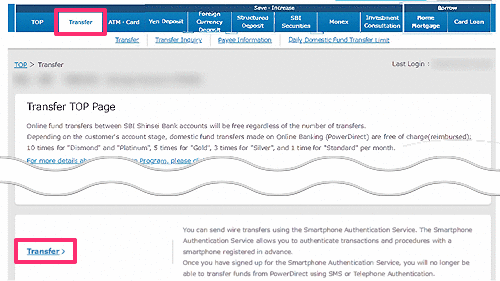
Click the"Transfer" tab and select"Transfer".
STEP2
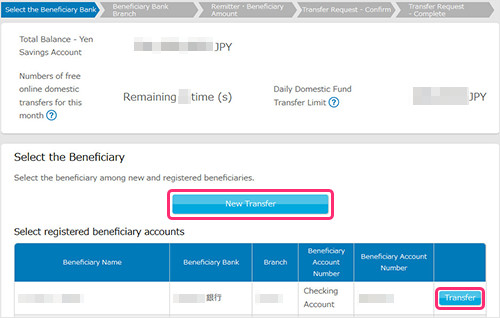
Please select the beneficiary. If you are transferring to a registered account, please select the beneficiary from the registered beneficiary accounts. Otherwise, please click on"New Transfer".
If you chose"New Transfer", please move to STEP3.
If you chose"registered beneficiary account", please move to STEP4.
STEP3
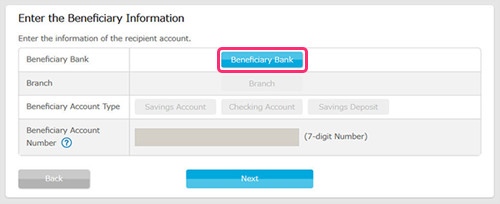
Enter the beneficiary bank information.Click on"Beneficiary Bank".
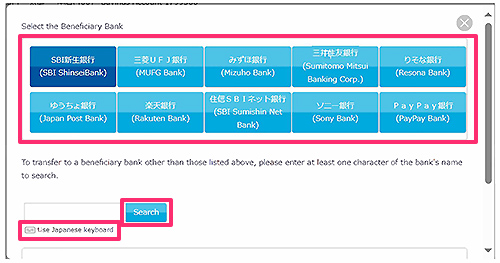
Select"Beneficiary Bank"from the list. If your beneficiary bank is not on the list, please enter one or more characters of the financial institution’s name and click "Search". For example, for "SBI Shinsei Bank,’" you could enter "S". (You can search using full-width hiragana, full-width katakana, full-width English letters, and kanji.) If you have trouble entering hiragana, please click on "Use Japanese Keyboard".
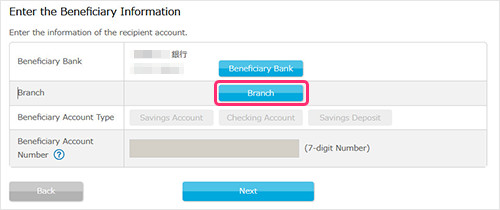
Click on"Branch".
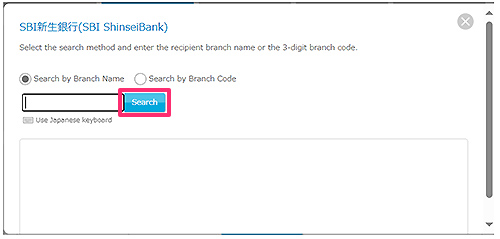
Select the search method, then enter at least one character of the recipient’s branch name or a three-digit branch code. After entering the information, press the "Search"button.
Please select the branch name you will be transferring to.
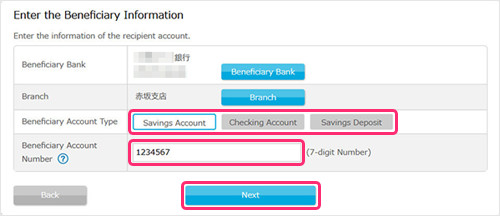
Select the"Beneficiary Account Type"from the following, Savings account (Futsu Yokin), Checking account (Toza Yokin), or Savings Deposit (Chochiku Yokin).
Enter the 7-digitBeneficiary Account Number(If the account number is 6 digits, please put 0 on the front.
If the account number is 5 digits, please put 00 before the account number) and click"Next".
STEP4
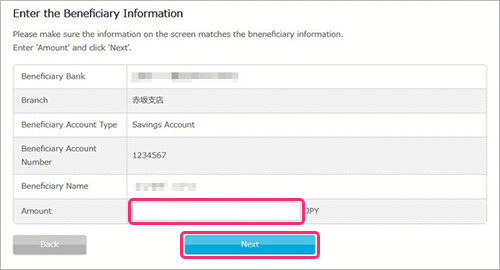
Input the amount you would like to transfer and click"Next".
STEP5
Please complete identity verification using one of the following methods: Smartphone Authentication, Telephone Authentication, or SMS Authentication.
For details on the authentication methods, please click here.
- Please note that prior registration is required to use Smartphone Authentication.
Smartphone Authentication is available in Japanese only.
For information on how to register, please click here.
STEP6
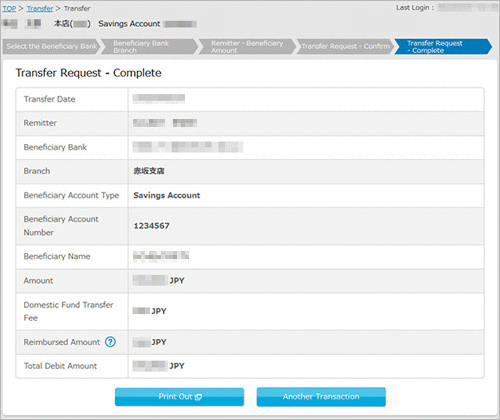
A notice stating that the transaction has been accepted will be displayed. Please print-out the screen if necessary, this page will be shown only once and cannot be recreated.
 Close
Close